Documentation
Script
The global Script API, used to load Java classes and manage script lifecycle.
The "Script" API
Every Script has the global Script object available, which exposes methods to interact with the script runtime, load Java classes, and manage script lifecycle.
Unload callbacks with Script.addUnloadCallback(callback: () => void): void
Registers a callback function that will be called when the script is unloaded. This is useful for cleaning up resources, despawning entities or handling any other teardown logic your script may need.
This callback will be called before the script is being reloaded or unloaded (because a parent reloads, or during server shutdown).
Script.addUnloadCallback(() => {
    console.log('Script is being unloaded, cleaning up resources...');
    // Perform cleanup tasks here
});
Script parent getter with Script.getCaller(): Script
This method can be used to get the direct parent script in the current stack, useful to make teardown logic for utility scripts that can be imported by multiple parents.
// utils.js
function makeEntity() {
    const entity = /* ... create entity logic ... */;

    // Register unload callback for the parent script
    const parentScript = Script.getCaller();
    parentScript.addUnloadCallback(() => {
        console.log('Parent script is unloading, removing entity...');
        // Logic to remove the entity
    });

    return entity;
}
Loading library jar files with Script.loadLibrary(relativeJarPath: string): void
Sometimes you need to bring in external Java libraries to use in your scripts, which you can now do at runtime with magic.
You can call Script.loadLibrary with a path relative to the current script, and it will load the jar file into the runtime classpath if it hasn't been loaded yet.
Script.loadLibrary('./uni-dialog-core-1.5.0.jar');
Script.loadLibrary('./uni-dialog-paper-1.5.0.jar');
Script.loadLibrary('./uni-dialog-adventure-1.5.0.jar');

/**
 * Core Dialog class from UniDialog
 * @see https://github.com/ProjectUnified/UniDialog
 */
export const Dialog = Script.loadClass('io.github.projectunified.unidialog.core.dialog.Dialog');
dialogue/
├── dialog.js
├── uni-dialog-adventure-1.5.0.jar
├── uni-dialog-core-1.5.0.jar
└── uni-dialog-paper-1.5.0.jar
Loading Java classes with Script.loadClass(className: string): any
Loads a Java class by its fully qualified name, giving you the JS representation of it.
Any imported class is cached for future invocations within the same file, and can be treated as if it's a native JS class. This means you can call the constructor directly, or access static methods and fields.
const ArrayList = Script.loadClass('java.util.ArrayList');
const list = new ArrayList();
list.add('Hello, PixelScript!');
console.log(list.size()); // Outputs: 1

const Math = Script.loadClass('java.lang.Math');
const randomValue = Math.random();
console.log(randomValue); // Outputs a random number between 0 and 1

// enum
const DayOfWeek = Script.loadClass('java.time.DayOfWeek');
console.log(DayOfWeek.MONDAY); // Outputs: MONDAY
You can also import an Interface and implement it using a JS object, which will generate a real class at runtime that can be coupled back to Java code.
const MySchedulerApi = Script.loadClass('com.example.myscheduler.api.MySchedulerApi');

// Runnables and Consumers are automatically generated
MySchedulerApi.scheduleTask((currentTime) => {
    console.log(`Current time is: ${currentTime}`);
}, 1000);

// but you can also implement full custom interfaces
const MyListener = Script.loadClass('com.example.myscheduler.api.MyListener');
const listenerImpl = new MyListener({
    onEvent(event) {
        console.log(`Event received: ${event}`);
    }
});

MySchedulerApi.registerListener(listenerImpl);
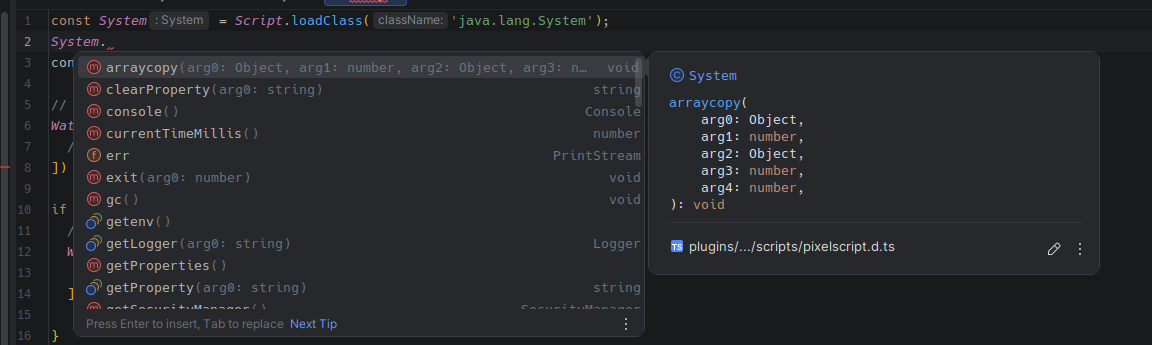
If a script loads a Java class that hasn't been seen before, the pixelscript.d.ts definition file will be regenerated to include the new class, giving you autocompletion in your IDE on next reload.
An overview of PixelScript's threading model and how it interacts with the Bukkit server thread.
Registering and managing commands through PixelScript.