Documentation
Scripts
A walkthrough of scripts, how they're loaded, and how to organize your script files.
Scripts!! Scripts!!! We're finally talking about scripts!
Scripts are always loaded relative from the plugins/PixelScript/scripts directory in your Minecraft server folder.
There are infinite possibilities to structure your project, but we've found that monolithic codebases tend to work best for PixelScript projects, where all servers in your network share the same set of scripts, with the environment determining which ones are active at any given time. This gives you a ton of flexibility with shared utils, commands and more.
In this article we'll setup your project outline, explain how scripts are loaded, how unload-trees work, and give you some tips and tricks to get the most out of your PixelScript setup.
Script loading order
Any .js files in the scripts folder will be loaded automatically (in an undefined order) when the PixelScript plugin is loaded by the server and all dependencies are ready.
Scripts at this "root" level are considered "main scripts", and typically reserved for your main entrypoint and hot fixes that must be loaded now on production without waiting for other scripts to load first.
Scripts placed, here are referenced as "root scripts", but there are two other types of scripts:
- watched: Watched scripts are scripts that are manually "watched". They don't hold a parent dependency, and act as clear reload-tree barriers.
- When the parent of a watched script is unloaded, the watched script will be unloaded as well.
- When the parent of a watched script is reloaded, the watched script will not be reloaded, thus acting as a barrier. This makes them great for subsystems/features that you don't want to have reloaded on a whim.
- When a watched script is edited, it will cause a reload of itself and all its direct children that don't have another active parent.
- When a script is no longer "watched", it will be unloaded (taking all of its children with it), letting you disable entire subsystems on the fly.
- imported: Imported scripts are scripts that export a function or value, and are imported by other scripts. These scripts are only loaded when one of their dependents is loaded, and unloaded when all dependents are unloaded.
- A file change of an imported script will cause a reload of itself, and all scripts that import it.
- Be careful with this! A small change in a commonly imported utility script can cause a massive reload tree, potentially impacting server performance. Be wary of the mighty reload cascade, your dev server won't be the first to fall from it!
- If a script is imported by multiple scripts, it will only have one instance at runtime! this means that if two scripts import the same utility script, they will share the same instance of it. More on this later.
- An imported script is only unloaded when all scripts that import it are unloaded.
- A file change of an imported script will cause a reload of itself, and all scripts that import it.
Building your entrypoint
Note: Some of this may seem a bit abstract at first, but it'll make sense once we dive deeper into the API in later articles. Bare with me for now! Note: from now on, all files mentioned will be relative to the
plugins/PixelScript/scriptsfolder.
For the sake of this guide, we'll be building our amazing server called "PSCraft", which will have a few simple features to get us started.
Lets start by making a new file called main.js in the scripts folder, which should be automatically loaded by your server

PSCraft will have more than just one server, but all sharing the same monolithic codebase.
We'll tell each server what "type" it is through an environment variable called PSCRAFT_SERVER_TYPE, which can be set before your startup. But for now, we'll have it default to lobby.
Go ahead and open up main.js in your IDE, and add the following code:
const System = Script.loadClass('java.lang.System');
const serverType = System.getenv("PSCRAFT_SERVER_TYPE") || "lobby";

// common (global utils)
Watcher.watch([
  // we don't have any yet!
])

if (serverType === "lobby") {
  // enable lobby modules
  Watcher.watch([
    // we don't have any yet!
  ])

}

if (serverType === "minigames") {
  // enable other modules
}
This code uses the Script loadClass API to load the
java.lang.Systemclass, which we use to read environment variables.
Example structure
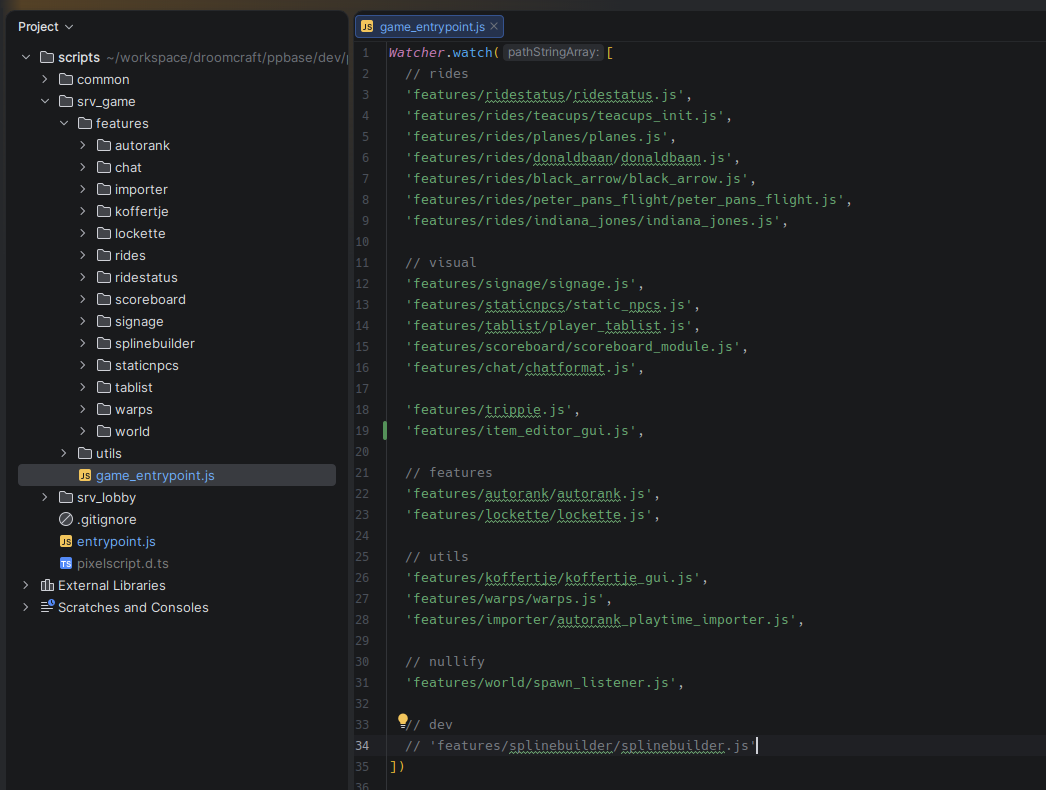
It may not feel like much now, but this structure gives us a lot of flexibility to build out our server in a modular way.
This is an example of how one server structured their codebase, with a common module loaded on all servers, and then an entry point per server where it loads server-specific modules:
Building our first module
Let's make our first module for the server: a simple /gamemode command that lets players
Then, we'll take the command example from the Command API article and move it into its own file called common/commands/gamemode.js.
Because this is a command that should be available on all server types, we'll setup a watcher for it in the "common" section of our main.js file:
Watcher.watch([
  'common/commands/gamemode.js'
])
We use a watcher in this case because the gamemode command is not exporting anything we need, and we want to be able to reload/disable it without affecting other parts of our codebase. Save the file, and you'll see that the gamemode command is now registered in your server!
The neat thing is that you can now also make more changes to the entrypoint script (main.js), and reload it without affecting the gamemode command, since it's a watched script and acts as a barrier in the reload tree.
A walkthrough of the PixelScript configuration options and how to customize them for your server setup.
Tips and tricks for working around limitations in Java's interop system.